
MD Engine 1.0.6 adds palette linking and VGM exports
The no-code Sega Genesis development tool gets its first major point update, adding cross-tab palette syncing and native audio exports.
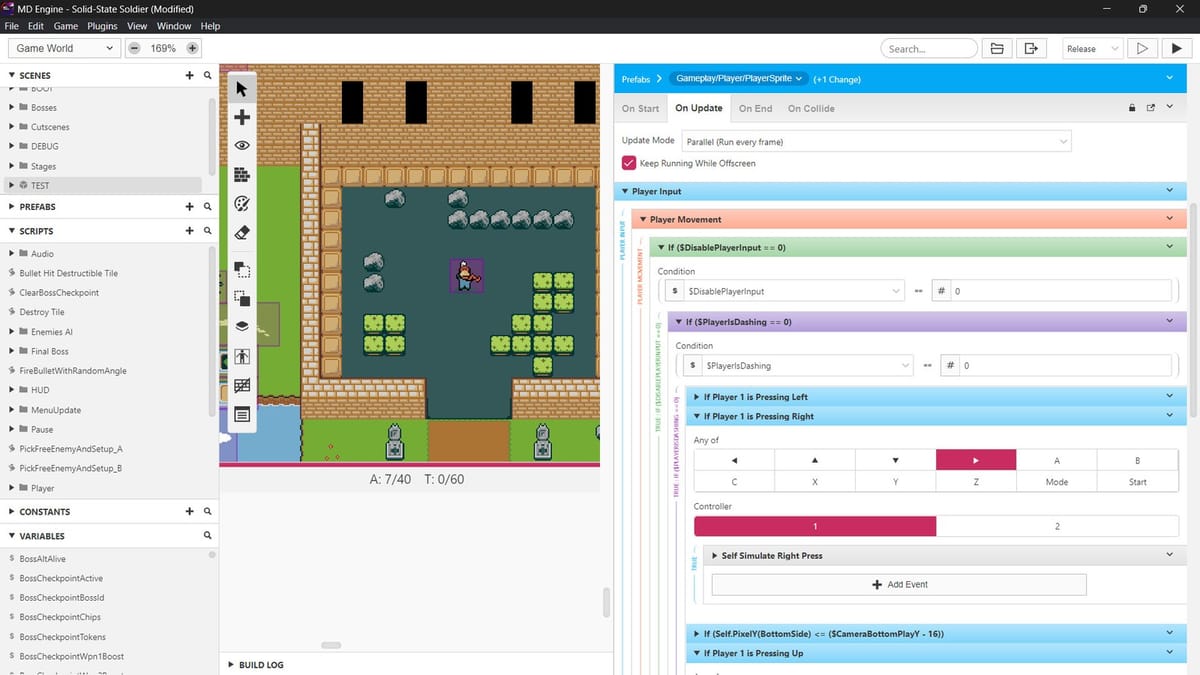
Two Black Cats released version 1.0.6 of MD Engine for Windows, macOS, and Linux, bringing palette linking and VGM exports to the no-code Sega Genesis development tool. The patch notes were posted to the Two Black Cats blog this weekend.
The engine officially launched earlier this month on September 7. It lets users build 16-bit games that compile into authentic ROMs for real Mega Drive hardware or FPGA clones without writing code. The base software costs $19.99. Two Black Cats is already known in the retro hardware space for producing the CatFlash development cartridges, and this software side of their operation is clearly getting rapid iteration.
The Sega Genesis homebrew scene has relied heavily on SGDK (Sega Genesis Development Kit) for years. SGDK is powerful, but it requires writing C code and setting up a traditional development environment. MD Engine takes a different approach. It provides a visual drag-and-drop interface similar to older versions of GameMaker, making it accessible to people who want to design levels and logic without learning C syntax.
Palette syncing across tabs
The 1.0.6 update focuses heavily on the built-in sub-editors. Mini Painter now supports exporting palettes and copying image parts directly between tabs.
The most useful addition is palette linking. You can now link palettes between Mini Painter, different tabs, and the engine itself. When you make a color change while Mini Painter is running, it updates everywhere in real time. Managing 16-bit color limitations is usually a headache, so I think this real-time syncing is going to save developers a massive amount of tedious menu navigation.
Native YM2612 audio exports
The audio side gets some attention too. Mini Tracker now allows native VGM and WAV exports. The Sega Genesis relies on the Yamaha YM2612 sound chip, and the VGM format is the standard for playing and sharing authentic FM synthesis tracks. Being able to export directly from the engine's tracker makes it easier to test music on real hardware before compiling the entire game.
Two Black Cats also added support for physical keys in the tracker, meaning QWERTZ keyboard layouts should function correctly now. There's a new flood paste tool and an experimental gamepad control option. I'm curious how well navigating a tracker interface with a D-pad actually works in practice, but the option is there.
Fixing the VBlank crashes
The compiler received several stability fixes. The engine doesn't crash anymore when using a Call Script command inside a HBlank or VBlank callback. For 16-bit development, horizontal and vertical blanking intervals are exactly when you want to update graphics in memory. Having the compiler crash during those callbacks was a major roadblock, so seeing it patched five days after launch is a good sign.
The update also handles recursion better when a script calls itself, and it fixes trigger local variable references inside subscripts.
Another fix addresses a crash that happened when enabling Platformer Mode on a project without any defined collisions. The developers also added explanatory notes to the Disable Collisions and Disable OnCollide Script events so users know exactly what those functions actually do. The engine also includes a new top-down game example in this update. Having template projects helps new users figure out the logic systems, especially since visual scripting can sometimes become just as complicated as standard code if you don't organize it well.
Comments ()