
Xbox Cloud Gaming rolls out overhauled web interface for public preview
Microsoft’s browser-based streaming hub gets a major UI refresh, integrating social features and improved navigation for Game Pass Ultimate subscribers.
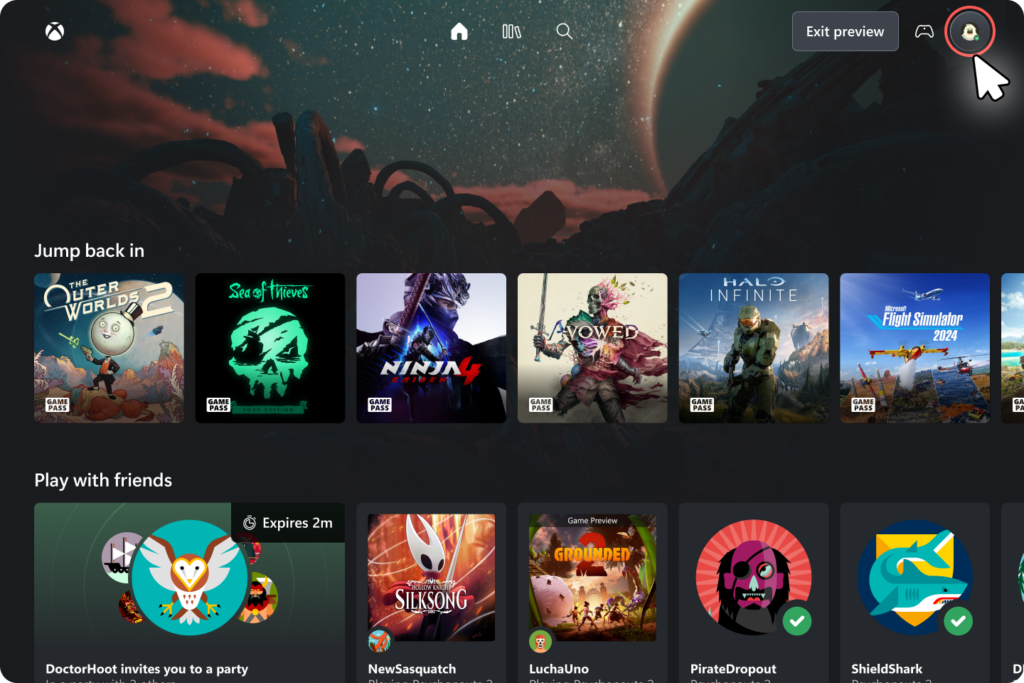
Microsoft has launched a public preview for a completely redesigned web interface for Xbox Cloud Gaming, aiming to bring the browser-based experience closer to the functionality of a dedicated console dashboard. The update is available immediately for Xbox Game Pass Ultimate subscribers who access the service through xbox.com/play.
Principal Product Manager Patrick Siu announced the rollout, noting that the update "lays the foundation for accelerating our ability to build new experiences" for the platform. While the service has seen incremental updates since its wider release, this represents the most significant visual and functional overhaul to the web client in recent years.
Browser Gaming, Evolved
The new interface introduces a cleaner visual hierarchy designed to reduce the friction between logging in and launching a game. According to Xbox Wire, the update integrates key social features directly into the browser window. Users can now manage friends lists, send messages, and organize parties without needing to pull up a secondary app or overlay. This addresses a long-standing complaint from PC and mobile users who found the previous web implementation isolating compared to the console experience.
Navigation has also been reworked. The new hub provides quicker access to recently played titles and offers more granular filtering options for the Game Pass library. For a service that now hosts hundreds of titles ranging from Halo Infinite to indie darlings like Vampire Survivors, discoverability has often been a weak point. The new UI attempts to surface relevant games more effectively rather than just presenting a wall of box art.
The Necessity of the Web
To understand why Microsoft is pouring resources into a web client, you have to look back at the history of Project xCloud. When the service began public testing in 2019, the focus was heavily on native Android applications. The pivot to a robust web-based solution was largely forced by Apple's App Store policies, which effectively banned a dedicated Game Pass app on iOS devices. Microsoft responded by building a browser-based workaround that could bypass the App Store entirely.
What started as a workaround has evolved into a primary access point. The web client allows Xbox Cloud Gaming to run on Chromebooks, Linux PCs, and even locked-down work laptops where installing a dedicated executable isn't an option. It operates by streaming video from custom Xbox Series X server blades in Microsoft's data centers, utilizing WebRTC technology to transmit inputs and video with minimal latency.
A Cloud-Based Future?
For preservationists and hardware purists, cloud gaming remains a contentious topic. You don't own the game, you don't control the hardware, and if your internet connection hiccups, your gameplay experience evaporates. There is no cartridge to blow into and no disc to resurface. When a game leaves the Game Pass service, it is simply gone from your library.
However, the utility of the technology is difficult to ignore. It allows players to sample titles without 100GB downloads and provides a way to play current-gen games on obsolete hardware. The ability to jump into a co-op session of Sea of Thieves via a browser tab on a low-spec laptop is a technical achievement that would have seemed like science fiction during the Xbox 360 era.


Comments ()