
Valve's new Steam Controller is coming next week
The successor to Valve's controversial 2015 gamepad borrows the Steam Deck's best tricks, including capacitive grips and magnetic sticks.
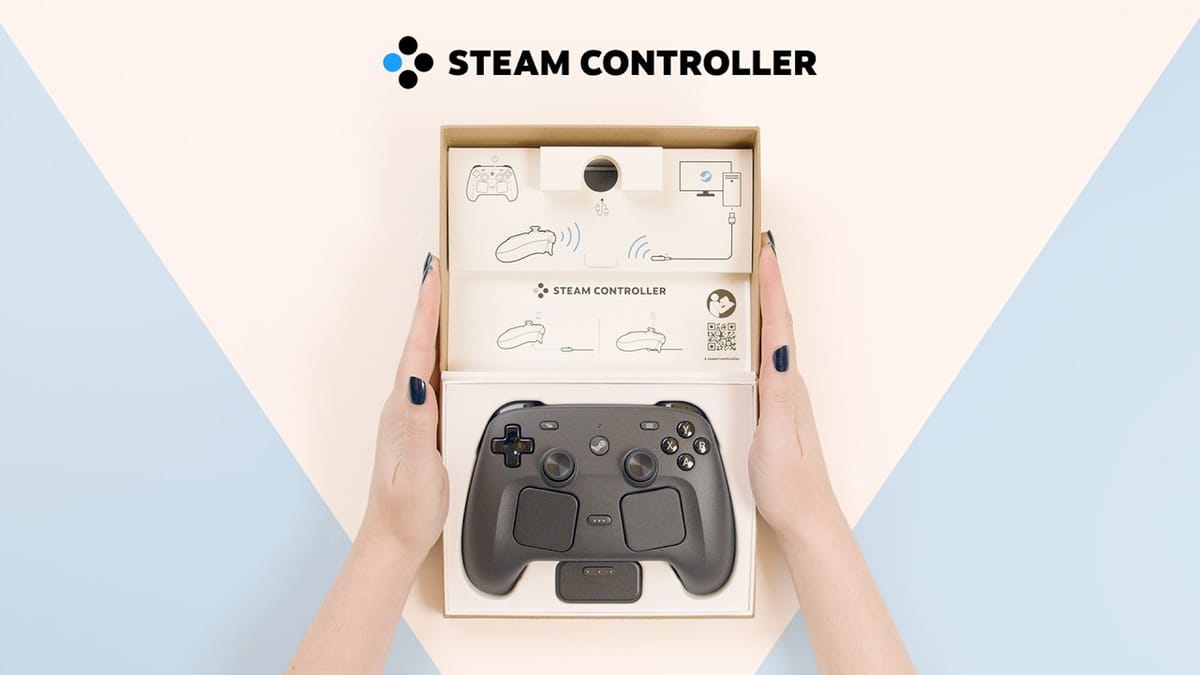
Valve has announced a brand new Steam Controller that launches on May 4. The hardware acts as a direct successor to the original 2015 model and incorporates several input technologies originally developed for the Steam Deck.
I still own two of the original controllers. I bought my second one during the infamous five-dollar blowout sale in November 2019 when Valve cleared out the remaining inventory. I never entirely understood why people disliked them so much. The learning curve was admittedly steep, mostly because you had to retrain your brain to use a massive haptic thumbpad instead of a right analog stick. Once you got used to it, those dual trackpads made PC strategy games genuinely playable on a living room television. Now, Valve is trying the concept again with a much more approachable layout.
Magnetic sticks and trackpads
The new controller has a standard gamepad layout alongside two customizable trackpads. Inside the box, you get the controller, a USB-A to USB-C cable, an information booklet, and a wireless receiver.
Valve added next-generation magnetic thumbsticks to the board. This is a direct response to the stick drift issues that plague modern console controllers. Magnetic sensors do not use physical potentiometers, which means they avoid the physical wear and tear that causes analog sticks to drift over time.
The trackpads return as mouse substitutes for 4X games and deck builders. They give players a precise way to control the camera in PC titles that lack native controller support. You can also configure them as radial pop-up menus for quick inventory access.
The grip ratcheting system
The most unusual new input method involves the handles. The controller has two capacitive grip sensors that detect when your fingers are actually touching the plastic. If you extend your fingers away from the grip, the sensor turns off. You can adjust the sensitivity in the software to match your resting hand position.
This solves a specific mechanical problem with gyro aiming. Players can use the grips to "ratchet" their aim. By releasing your fingers, you temporarily disable the gyro sensor. This lets you physically reset your hands to a neutral position without moving the in-game camera. You can also map the grip release to other actions. Lifting a single finger could pull up a weapon wheel or open the map screen.
The charging puck
The package includes a device Valve calls the Puck. It functions as both the wireless receiver and a magnetic charging station. You plug the Puck into your PC via a USB-C cable for the lowest latency wireless connection. When you finish playing, the controller snaps magnetically onto the Puck to recharge.
The setup process requires a specific sequence for firmware updates. The Puck updates first. Once that finishes, you unplug the USB cable from the Puck and connect it directly to the controller for its own update. After that, the hardware handles everything wirelessly.
Big Picture integration
The software experience mirrors the Steam Deck. Pressing the Steam button turns the controller on and automatically connects it to the PC. Pressing it again opens Big Picture mode. Valve promises frequent software updates to expand the configuration tools over time.
The original Steam Controller tried to completely replace the mouse and alienated players who just wanted a normal gamepad. This new model bridges the gap between traditional twin-stick layouts and PC-centric inputs. If the grip sensors and magnetic sticks work as well as they do on the Steam Deck, this could be quite literally game changing for desktop players.
You can wishlist the hardware now on the official Steam store page.

Comments ()