
You can now boot Apple's cancelled Copland OS in your browser
Thirty years after Apple scrapped its ambitious System 7 successor, a modified DingusPPC emulator brings Copland build D11E4 to WebAssembly.
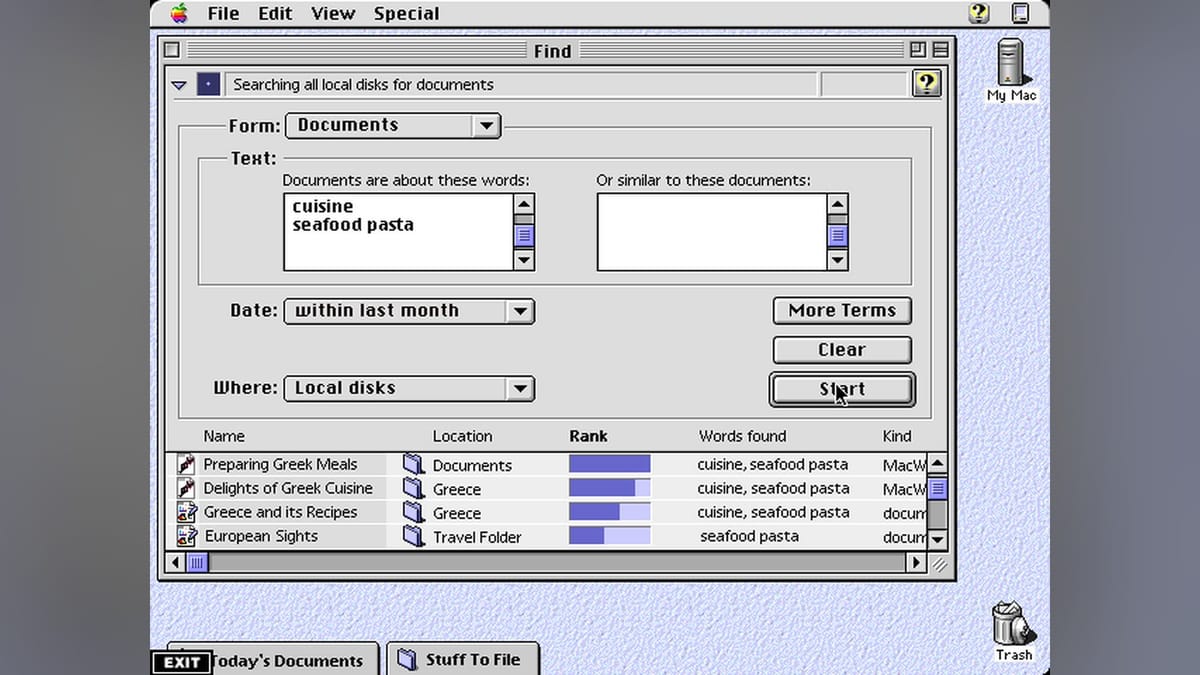
Thirty years after Apple cancelled its next-generation operating system, you can boot Copland build D11E4 directly in a web browser. Vintage computing researcher Michael Steil published a WebAssembly port of the DingusPPC emulator that successfully runs the notorious 1996 developer release.
The project is documented on pagetable.com, where Steil explains the technical hurdles of getting the OS to function. Copland is notoriously difficult to run on physical hardware and has historically evaded emulation entirely.
The System 7 successor
Apple announced Copland in 1994 as the foundation for Mac OS 8. The goal was to replace the aging System 7 architecture with a modern microkernel called NuKernel. It promised preemptive multitasking and protected memory. At the time, a single crashed application could take down an entire Macintosh, and Copland was supposed to isolate background tasks to prevent system-wide lockups as Apple transitioned to PowerPC processors.
The project collapsed under its own weight. Copland suffered from severe feature creep and architectural instability. Internal builds were incredibly fragile, often requiring specific developer ROMs and expansion cards just to reach the desktop on physical hardware. Apple finally cancelled the project in August 1996, opting instead to buy NeXT and adapt NeXTSTEP into what eventually became Mac OS X.
Copland is a massive technological dead end, and actually running it has been nearly impossible. Standard classic Mac emulators like SheepShaver rely on high-level ROM patching, which completely breaks Copland's low-level NuKernel initialization. DingusPPC takes a different approach, focusing on cycle-accurate emulation of the PowerPC 601 MMU and peripheral controllers.
Eleven patches to boot
Steil implemented 11 specific patches against the DingusPPC core to resolve timing assertions, memory management quirks, and bus emulation errors that previously stopped the June 1996 developer release from progressing through boot. Interestingly, the main DingusPPC repository does not accept code written with the help of AI, so Steil has left the door open for other developers to rewrite these fixes based on his commit explanations if they want them merged upstream.
The WebAssembly build matches real-time execution on modern hardware, reaching the desktop in about 30 seconds. The browser environment includes an interactive debugger. If the fragile OS code hits an assertion, execution halts and drops into the debugger until you click continue.
Solitaire on a doomed microkernel
Once booted, the environment is sparse. You must click the screen to capture the mouse and keyboard, and press Escape to release them. The main attractions are a few included demonstration utilities, namely GXSlidemaster and Eric's Solitaire. It is a brief, stable look at an operating system that almost took Apple down with it, now running quietly in a browser tab.

Comments ()